Contents
- Index
S- Special Reports Menu
Option [S] in the Reports Menu.
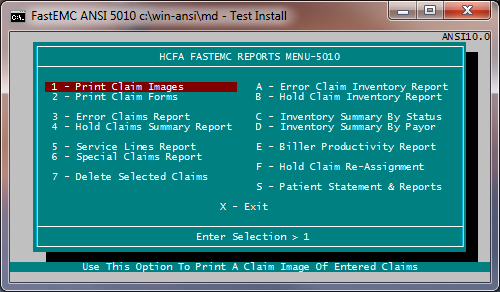
1. Prints claim images that include the created date.
2. Prints claim data into the correct boxes on a preprinted CMS 1500 paper claim form.
3. Prints a summary of all claims in error status.
4. Prints a summary of all claims in a hold status.
5. Prints a report based on claim detail.
Note: You must enter a beginning and ending date on both service date and transmitted date questions.
1- Print Claim Images
2- Print Claim Forms
3- Error Claims Report
4- Hold Claims Summary Report
5- Service Lines Report
6- Special Claims Report
7- Delete Selected Claims
A- Error Claim Inventory Report
B- Hold Claim Inventory Report
C- Inventory Summary By Status
D- Inventory Summary By Payor
E- Biller Productivity Report
F- Hold Claim Re-Assignment
S- Patient Statement & Reports