Contents
- Index
8- Facility File
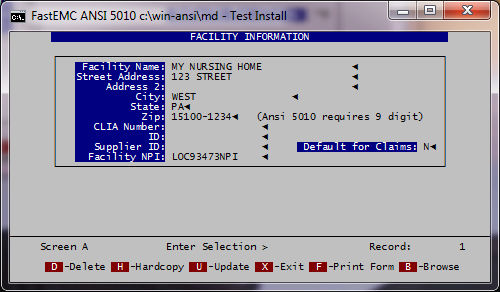
Option [8] in the Maintenance Menu.
1- Add New Facility
2- Update/Delete Facility
Information entered on this screen will create a browse lookup during claim entry or correcting by using the [F6] function when reporting Facility where services were rendered if other than office or home.
Name of Facility
Enter the names of all the facilities where services will be rendered. When entering the facility information on the claim, this list will produce a browse window.
Facility Address (ADR1, ADR2)
Enter the address where the facility is located.
Facility City
Enter the city where the facility is located.
Facility State
Enter the state where the facility is located.
Zip
Enter the zip code where the facility is located.
Facility ID #
Enter the facility ID number if applicable.
CLIA #
Enter the CLIA # for the facility if applicable. Default for claims Put in a [Y] if all services are being rendered in this one facility.
Press [ESC] to record information.