Contents
- Index
1- System Setup
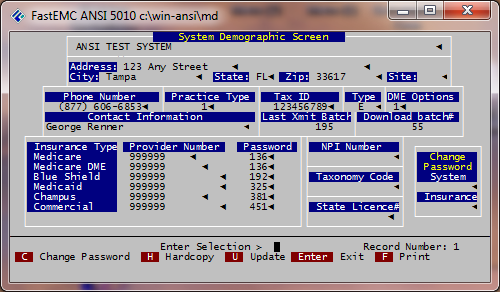
Option [1] on the Maintenance Menu
Practice Name
Enter the group or individual provider name. This is limited to 22 characters.
Note: If Service Bureau Operation, the name of the Billing Service should be entered.
Address
Enter the address of the provider.
City
Enter the city where the provider is located.
State
Enter the state where the provider is located.
Zip
Enter the zip code where the provider is located.
Site
Enter a provider assigned code to identify a provider's specific billing location.
Phone Number
Enter the phone number (Area code + 7 digit number) of the provider. Do not use any punctuation or spaces.
Practice Type
Enter [S], if solo practice
Enter [1], if billing for more than 1 provider.
Type
Enter the type of tax ID indicator. E = Employer ID Number S = Social Security Number X = Corporate
Specialty
Enter provider specialty. (Used for solo practice physicians only) [F6] for valid codes.
Download Batch Number
Shows last batch number of imported claims via download.
Last Xmit Batch
This field displays the batch number assigned to the last batch of created claims.
Format Type - defaulted
DME Options
Enter the Durable Medical Equipment option.
1 = Medicare Medical only
2 = Medicare DME only
3 = Both (option 2 and 3 used for Indiana only)
Provider Number
If the provider is a sole practice, enter the provider ID number assigned the provider. Note: For Practice Type 1, provider numbers are entered in the provider file. The default will appear as 9's.
Submitter ID
Enter the submitter ID assigned by the Clearinghouse.
Password
Enter the codes indicating which payers you can bill. These are assigned by the FastEMC Sales department or Help Desk. This password field is not used for passwords assigned by clearinghouse.
Change Passwords
DO NOT use unless you want to restrict access to the System Setup or Insurance File for updating purposes. To use, type "Y" and system will ask for a password.
Press [ESC] - to record information.