Contents
- Index
FastEMC File Maintenance Menu
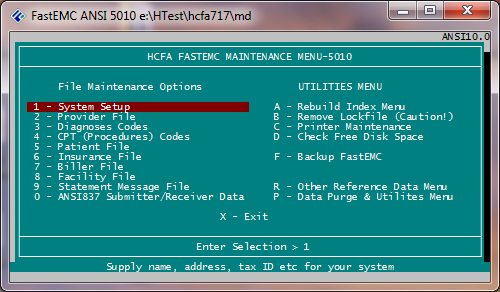
This manual will start with the Maintenance Menu since it explains the System Setup and Provider File, both of which are necessary before claim entry can begin.
1. System Setup- Allows the user to update the Systems file with the name, address, phone, tax ID, etc.
2. Provider File- Allows the user to add, update and/or delete the providers.
3. ICD-9-CM (Diagnosis) Codes- Allows the user to add, change and/or delete records in the diagnosis file. This file is only used if function is activated in the System Setup.
4. Update CPT (Procedures) Codes- Allows the user to add, change and/or delete records in the CPT/HCPCS file. This file is only used if function is activated in the System Setup.
5. Patient File- Allows the user to add, change or delete patients. This file is only used if function is activated in the System Setup. A patient record is also stored after a claim is entered.
6. Insurance File- Allows the user to add, change and/or delete insurance companies in the Insurance File.
7. Biller File- Allows the user to update/add billers. (Only used for multiple billers)
8. Facility File- Allows the user to update facilities.
9. Statement Message File- Allows the user to update messages used on statements such delinquent messages.
U- Utilities Menu
R- Other Reference Data Menu
P- Data Purge Menu
Note: To avoid lost clusters, a system backup should be done before claims are purged. This file does not need to be purged after every transmission. Claims may be accumulated, as long as, there is available disk space. Because FastEMC does not release this space back to the root directory, the check disk function will not reflect free space as a result of the purge.